



Video Training →How To Draw Hairy Creatures In Photoshop
Published by: Baturi on 14-09-2022, 19:32 |  0
0
Last updated 4/2018
MP4 | Video: h264, 1280x720 | Audio: AAC, 44.1 KHz
Language: English | Size: 446.61 MB | Duration: 2h 40m
(Using Photoshop Spatter Brushes)
What you'll learn
These exercises will condition the student to be able to work faster on deadlines and with repetition help them to remember tools, and short cuts for faster deadline delivery.
Requirements
You should have some knowledge of Photoshop, as well as a graphics tablet (e.g. Wacom Intuos, etc)
Beginner to Intermediate
Description
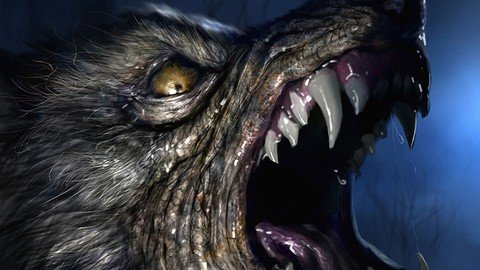
It starts as a doodle, with some real photo references off to the side. No, not of a werewolf. Of some dogs. Then I show how it can be fun to create a spontaneous illustration of a crazy fictitious creature... But then also, show how challenging it can be to try and make it into something acceptable to the artist when you follow that path. It's a great exercise, and you will witness me struggling a t a few points and then finally resolve where I want to go with this kind image. I believe it is important to share this aspect, as I have met many artists who run into those snags where the art just doesn't feel right to them. And then they STOP. Don't stop! Look for alternative paths! The ending can be rewarding.
Overview
Section 1: Introduction
Lecture 1 Introduction
Lecture 2 Starting with the small (#14) Spatter Brush in Photoshop
Lecture 3 Getting started: Doodle some details (warm up!)
Lecture 4 Warm up 1: Sketching a Creature Face.
Lecture 5 Warm up 1: Finishing the Creature face sketch...
Lecture 6 Warm Up 2: Sketching a woman's face
Lecture 7 Warm up 3: Sketching a wolf creature head...
Lecture 8 Wolf 1: Starting the Werewolf...
Lecture 9 Wolf 2: Adding first details (teeth, hair/fur on the edges)
Lecture 10 Wolf 3: Adding more detail and working on Hand layer.
Lecture 11 Wolf 4: Begin to add color
Lecture 12 Wolf 5: Closer detail (around eye)
Lecture 13 Wolf 6: Add more details-- flop image for a fresher view
Lecture 14 Wolf 7: Liquify to change shape; rework details for improvement
Lecture 15 Wolf 8: Re-establish details, picture beginning to take shape!
Lecture 16 Wolf 9: More detail; introduce custom brushes
Lecture 17 Wolf 10: Home stretch! Final crisp details.
Anyone who wants to learn ways to improve their drawing speed.
Homepage
https://www.udemy.com/course/how-to-draw-hairy-creatures-in-photoshop/
Download from UploadCloud
https://www.uploadcloud.pro/ta5tykp7fjav/uinas.How.To.Draw.Hairy.Creatures.In.Photoshop....rar.html

https://rapidgator.net/file/420fc564edcf3bf5a1f4391ee9649062/uinas.How.To.Draw.Hairy.Creatures.In.Photoshop....rar.html

https://uploadgig.com/file/download/Bbaefa0C2e7b3dD4/uinas.How.To.Draw.Hairy.Creatures.In.Photoshop....rar

https://nitroflare.com/view/46431E2070620EF/uinas.How.To.Draw.Hairy.Creatures.In.Photoshop....rar
Please Help Me Click Connect Icon Below Here and Share News to Social Network | Thanks you !
Help Us Grow – Share, Support
We need your support to keep providing high-quality content and services. Here’s how you can help:
- Share Our Website on Social Media! 📱
Spread the word by sharing our website on your social media profiles. The more people who know about us, the better we can serve you with even more premium content! - Get a Premium Filehost Account from Website! 🚀
Tired of slow download speeds and waiting times? Upgrade to a Premium Filehost Account for faster downloads and priority access. Your purchase helps us maintain the site and continue providing excellent service.
Thank you for your continued support! Together, we can grow and improve the site for everyone. 🌐
Related News
-
{related-news}
Comments (0)

Information
Users of Guests are not allowed to comment this publication.
Search
Updates
Partner
» TutBB
» Byte
» Crawli
» Warezomen
» Warez-DDL
» Raidrush
» KATZCD
» Free Ebooks Library
Your Link Here ?
(Pagerank 4 or above)
» Byte
» Crawli
» Warezomen
» Warez-DDL
» Raidrush
» KATZCD
» Free Ebooks Library
Your Link Here ?
(Pagerank 4 or above)