



Software / Programming Software →Devart Code Compare Pro 5.3.231
Published by: Baturi on 21-04-2022, 21:44 |  0
0
Devart Code Compare Pro 5.3.231 | 10.4 Mb
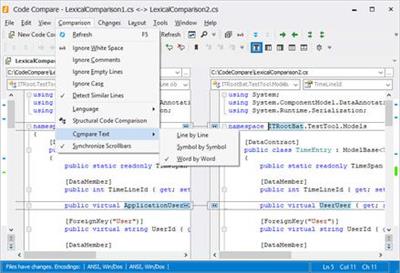
Code Compare is a pro compare tool designed to compare and merge differing files and folders. Code Compare integrates with all popular source control systems: TFS, SVN, Git, Mercurial, and Perforce. Code Compare is shipped both as a standalone file diff tool and a Visual Studio extension. Download Devart Code Compare and manage code changes with ease!
Text Comparison and Merging:
Colored blocks for inserted, deleted, and modified text
Detailed highlighting of changes within lines
Collapsing of unchanged text regions (CodeCompare Pro-feature)
Point-and-click merge with a mouse
Editing files on the fly with a reliable file compare tool
Merging shortcuts for advanced users
Semantic Source Code Comparison:
Structure comparison mode - comparing sources via their signature and not only by their location.
Lexical comparison from major programming languages - C#, C++, Visual Basic, jаvascript, Java, XML
Syntax highlighting for programming languages
Matching methods in compared source code files
Similar lines of code are matched even after refactoring
Detecting moved blocks of code if source code is reordered in files
Displaying changes in code structure in Difference Explorer
Code outlining for collapsing and expanding regions of code
Folder Сomparison:
Advanced diff directories compare utility
Color-coding for added, deleted, and modified files
Filtering options for excluding or including certain file types
Instant opening of individual file comparison documents
Display options for better comparison result analysis
Batch file copying from pane to pane or to a selected folder
Visual Studio Integration:
Compare code without leaving your favourite environment
Native Visual Studio extension for smooth integration
Visual Studio 2015, 2017, and 2019 supported
Choose to use standalone or integrated Code Compare on the fly
Link Code Compare to Android Studio as an external tool to compare and merge code
Version Сontrol Integration:
Colored blocks for inserted, deleted, and modified text
Integrates with version control systems as the merging tool for conflicting file revisions
Non-conflicting changes are merged automatically
Merging conflicts are highlighted
One-click conflict resolution with a mouse button
Three-way comparison to compare and merge three files side-by-side
Note: The latest version of Code Compare supports integration with Visual Studio 2015, 2017, 2019.
Home Page-
https://www.devart.com/
https://hot4share.com/umdwz7tt3530/oos0e.Devart.Code.Compare.Pro.5.3.231.rar.html

https://rapidgator.net/file/4411a24115a2c9cf0b9f4e1b1391cbe8/oos0e.Devart.Code.Compare.Pro.5.3.231.rar.html

https://uploadgig.com/file/download/e16bbCc5b9348a22/oos0e.Devart.Code.Compare.Pro.5.3.231.rar

https://nitro.download/view/1A1A30A791FBDA8/oos0e.Devart.Code.Compare.Pro.5.3.231.rar
Help Us Grow – Share, Support
We need your support to keep providing high-quality content and services. Here’s how you can help:
- Share Our Website on Social Media! 📱
Spread the word by sharing our website on your social media profiles. The more people who know about us, the better we can serve you with even more premium content! - Get a Premium Filehost Account from Website! 🚀
Tired of slow download speeds and waiting times? Upgrade to a Premium Filehost Account for faster downloads and priority access. Your purchase helps us maintain the site and continue providing excellent service.
Thank you for your continued support! Together, we can grow and improve the site for everyone. 🌐
Related News
-
{related-news}
Comments (0)

Information
Users of Guests are not allowed to comment this publication.
Search
Updates
Partner
» TutBB
» Byte
» Crawli
» Warezomen
» Warez-DDL
» Raidrush
» KATZCD
» Free Ebooks Library
Your Link Here ?
(Pagerank 4 or above)
» Byte
» Crawli
» Warezomen
» Warez-DDL
» Raidrush
» KATZCD
» Free Ebooks Library
Your Link Here ?
(Pagerank 4 or above)