



Software / Multimedia →Red Rock Sound 11FF v1.0.0
Published by: CrackSerial79 on 20-02-2026, 00:19 |  0
0
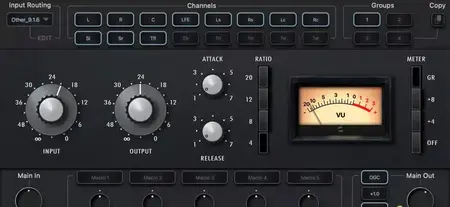
Free Download Red Rock Sound 11FF v1.0.0 | 5.4 MB
A prime compressor, optimized for modern times.
11FF Immersive Compressor / Limiter
The 11FF Compressor/Limiter was developed in collaboration with NICHOLAY MIX.
Most of us are musicians and/or sound engineers. We love the recording process and are
truly inspired when tracks are recorded beautifully. Our goal in developing the 11FF was to
create a compressor/limiter that we ourselves would enjoy using-one that would evoke that
wow factor that comes from listening to music recorded in its most natural, inspired form.
We made a careful side-by-side comparison of the hardware original and our emulation to
ensure the 11FF plug-in works indistinguishably from its physical prototype in terms of sound
character.
Designed for fast and efficient work on mid/side, stereo and the objects, the beds (fixed
channels) of immersive mixing environments.
INPUT ROUTING PANEL
Groups
This module allows you to select an Compressor from four available. The Compressor are arranged in series, this allows you to process channels with different compressor settings.
For example: the first Limiter is only the mid channel, the second Limiter is only the side channel, the third Limiter is the left and right channel. For multi-channel modes: the first Limiter is only the left and right channels, the second Limiter is the center channel, the third Limiter is the LFE, etc.
You can rename Channel Group Buttons for ease of use. To rename the selected Channel Group button, right- click on the button.
In order to turn on the solo (listen) of the Compressor, double-click on the selected Channel Group number.
The Channel Group solo mode glows yellow, to exit solo mode, double-click again. For two-channel modes, only one unit can be solo mode. For multi-channel modes, one or more units can be soloed.
To bypass selected Compressor processing, press the selected Channel Group number one click + shift. In bypass mode, the button will glow red.
You can also copy all Compressor settings to another Channel Group. To do this, select the Channel Group from which you want to copy the settings, then click on the copy button, then select the Channel Group to which you want to copy the settings.
Input Routing
Input Routing lets you choose between 44 common channel setups, starting from Stereo up to 7.1.4 and 9.1.6. Simply select in the input routing module the channel setup that fits your track.
You can also create your own input routing profiles. 16 independent channels are available.
Click on the edit button next to the input routing selection display. Hold down the shift button and select the desired number of channels. Name selected channels in order. Then click save and name the profile.
Channels
In this module, you can select (activate) the channels that the Compressor will process in selected Channel Group.
Home Page-
https://redrocksound.pro/en/11ff/Buy Premium From My Links To Get Resumable Support,Max Speed & Support Me
Rapidgator-->Click Link PeepLink Below Here Contains Rapidgator
http://peeplink.in/519d4278069c
DDownload
oy8gn.Red.Rock.Sound.11FF.v1.0.0.rar
FreeDL
oy8gn.Red.Rock.Sound.11FF.v1.0.0.rar.html
AlfaFile
oy8gn.Red.Rock.Sound.11FF.v1.0.0.rar
Links are Interchangeable - No Password - Single Extraction
Help Us Grow – Share, Support
We need your support to keep providing high-quality content and services. Here’s how you can help:
- Share Our Website on Social Media! 📱
Spread the word by sharing our website on your social media profiles. The more people who know about us, the better we can serve you with even more premium content! - Get a Premium Filehost Account from Website! 🚀
Tired of slow download speeds and waiting times? Upgrade to a Premium Filehost Account for faster downloads and priority access. Your purchase helps us maintain the site and continue providing excellent service.
Thank you for your continued support! Together, we can grow and improve the site for everyone. 🌐
Related News
-
{related-news}
Comments (0)

Information
Users of Guests are not allowed to comment this publication.
Search
Updates
Partner
» TutBB
» Byte
» Crawli
» Warezomen
» Warez-DDL
» Raidrush
» KATZCD
» Free Ebooks Library
Your Link Here ?
(Pagerank 4 or above)
» Byte
» Crawli
» Warezomen
» Warez-DDL
» Raidrush
» KATZCD
» Free Ebooks Library
Your Link Here ?
(Pagerank 4 or above)