



Software / InterNet Tools →Automatic Email Processor 4.0.29
Published by: CrackSerial79 on 22-06-2026, 00:14 |  0
0
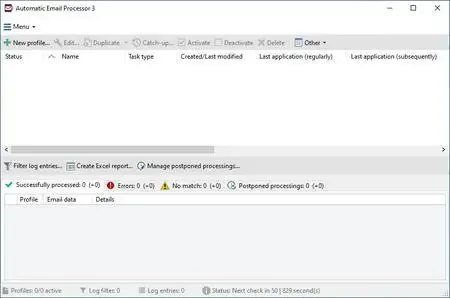
Automatic Email Processor 4.0.29 | 41.3 Mb
Automatic Email Processor is an Outlook automation utility designed to manage incoming emails and attachments without manual intervention. The software monitors Outlook folders in real time and processes messages according to customizable rules, making it ideal for businesses and users who need reliable email archiving, printing, routing, and document management.
The application provides extensive filtering options based on sender, recipient, subject, attachment names, and other email properties. Emails and attachments can be automatically saved to dynamically generated folders, allowing organizations to maintain a structured archive based on dates, contacts, departments, projects, or other criteria.
In addition to saving messages, the program can automatically print emails and attachments, launch external applications, move processed messages to specific Outlook folders, generate reports, and perform a wide range of follow-up actions. With support for an unlimited number of rules, it can be tailored to different accounts, workflows, and business processes.
For archiving purposes, emails can be stored in various formats including PDF, RTF, HTML, and Outlook MSG. Attachments may also be extracted, archived, detached from messages to reduce PST file size, or processed automatically based on predefined conditions.
Key Features:
- Monitor Outlook folders automatically
- Process incoming emails using custom rules
- Save emails in PDF, RTF, HTML, or MSG format
- Automatically archive email attachments
- Create dynamic folder structures from email properties
- Print emails and attachments automatically
- Support for unlimited processing rules
- Filter by sender, recipient, subject, and attachments
- Extract files from ZIP archives
- Forward messages and send status notifications
- Launch external programs after processing
- Mark emails as read automatically
- Move processed emails to other Outlook folders
- Reprocess existing Outlook messages
- Generate Excel-based reports and summaries
- Schedule processing for specific days and times
- Detach attachments to reduce PST file size
- Delay attachment detachment when required
- Support command-line automation options
System Requirements
Operating System: Windows 11, 10, 8, 7 or Server (32-bit or 64-bit version)
Home Page
https://gillmeister-software.com/
Buy Premium From My Links To Get Resumable Support,Max Speed & Support Me
Links are Interchangeable - No Password - Single Extraction
Help Us Grow – Share, Support
We need your support to keep providing high-quality content and services. Here’s how you can help:
- Share Our Website on Social Media! 📱
Spread the word by sharing our website on your social media profiles. The more people who know about us, the better we can serve you with even more premium content! - Get a Premium Filehost Account from Website! 🚀
Tired of slow download speeds and waiting times? Upgrade to a Premium Filehost Account for faster downloads and priority access. Your purchase helps us maintain the site and continue providing excellent service.
Thank you for your continued support! Together, we can grow and improve the site for everyone. 🌐
Related News
-
{related-news}
Comments (0)

Information
Users of Guests are not allowed to comment this publication.
Search
Updates
Partner
» TutBB
» Byte
» Crawli
» Warezomen
» Warez-DDL
» Raidrush
» KATZCD
» Free Ebooks Library
Your Link Here ?
(Pagerank 4 or above)
» Byte
» Crawli
» Warezomen
» Warez-DDL
» Raidrush
» KATZCD
» Free Ebooks Library
Your Link Here ?
(Pagerank 4 or above)