



Software / Software for macOS →SwitchResX 4.12 Multilingual macOS
Published by: Baturi on 20-06-2022, 18:52 |  0
0

SwitchResX 4.12 Multilingual macOS | 6.5 MB
Languages: English, Čeština, Deutsch, Français
SwitchResX is the most advanced tool for Apple computers to take control of any screen connected to the Mac. No matter whether a MacBook Screen, an external monitor, a Retina display, a TV set or a beamer: SwitchResX can handle them all - if you want, straight from the menubar, a contextual menu or both. It's that easy!
Preference Pane And More
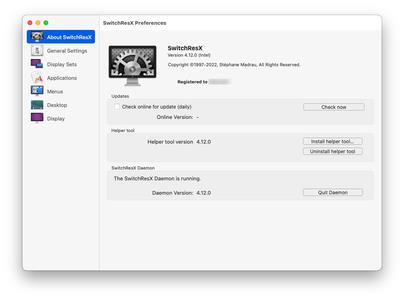
When installed, SwitchResX sits in the Preference Panes and can be activated like any other of those helpers. SwitchResX pops open in a separate window for easy access of its' vast amount of functions, that outrun Apples inbuilt Monitor preference pane easily.
Ultimate Control
With SwitchResX you can keep control of your screen resolution and the way, every single app displays its content on your screen - or screens! Because SwitchResX can of course handle more than one screen totally individually, it gives you all the freedom and flexibility you need at any time.
Drill Down Into Details
On top, SwitchResX includes a huge amount of additional functions, like
Saving desktop layouts to get everything back into position right the moment, you jump back to a certain resolutionDisable or activate screens on demand, for example to use a Macbook in clamshell modeLink screens to specific events like Key shortcuts, Applescript, Application launches and moreCreate and enable new custom resolutions to adapt to any available screen, including screens inbuilt into carsRename resolutions to regular and useful terms like Gaming, Documents, Graphics, Presentation, TV etc.Arrange desktop items on a much finer grid than Apple' standard settingsKeep a record of any change in screen setting automatically
SwitchResX 4.12
Allows to display the resolutions in main menu with the different frequencies in submenus. Also allows to sort the resolutions hierarchically in the preferences applicationshows a full featured contextual menu with all options again, but separated from the Finder contextual menu, and shown with command key pressed on the Finder desktopChanges the look for brightness and underscan sliders in the menusAdds some properties to AppleScript dictionary when managing the DisplaySetsSolves an issue where settings from a Display Set couldn't be applied from AppleScript any moreSolves an issue where new created custom resolutions would not show in the list after reboot, on Apple Silicon MacsTries to be smarter when reading settings and matching displays for configuration with identical displaysSolves an issue where all displays would be noted having a notch if the first display has a notch (Apple Silicon Macs only, obviously)Solves an issue when trying to get resolutions parameters on resolutions with similar frequenciesSolves an issue when the display number was added twice to the display nameSolves an issue where the brightness was not correctly set and not correctly recorded in AppleScript editorSolves an issue where SwitchResX would save Finder icons positions before resolution changes, even if not asked, and this would lead to long response times on macOS 12+
Download:[/b]




Help Us Grow – Share, Support
We need your support to keep providing high-quality content and services. Here’s how you can help:
- Share Our Website on Social Media! 📱
Spread the word by sharing our website on your social media profiles. The more people who know about us, the better we can serve you with even more premium content! - Get a Premium Filehost Account from Website! 🚀
Tired of slow download speeds and waiting times? Upgrade to a Premium Filehost Account for faster downloads and priority access. Your purchase helps us maintain the site and continue providing excellent service.
Thank you for your continued support! Together, we can grow and improve the site for everyone. 🌐
Related News
-
{related-news}
Comments (0)

Information
Users of Guests are not allowed to comment this publication.
Search
Updates
Partner
» TutBB
» Byte
» Crawli
» Warezomen
» Warez-DDL
» Raidrush
» KATZCD
» Free Ebooks Library
Your Link Here ?
(Pagerank 4 or above)
» Byte
» Crawli
» Warezomen
» Warez-DDL
» Raidrush
» KATZCD
» Free Ebooks Library
Your Link Here ?
(Pagerank 4 or above)