



Software / Software for macOS →Snapper 3.1.0 macOS
Published by: Baturi on 20-08-2021, 23:52 |  0
0

Snapper 3.1.0 macOS | 6.6 MB
Snapper works with your Mac like a dream! Whenever you select any of your audio files in the Mac Finder, Snapper appears immediately right beneath that window, showing you the wave form and giving you a host of options right then and there. You can quickly preview the file, upload it to your Pro Tools session, or convert it to another file format as easily as dragging-and-dropping. Opening over 50 sound file formats, Snapper will quickly become your go-to solution for audio previewing and file conversions its so useful you'll hardly remember what your Mac was like without it.
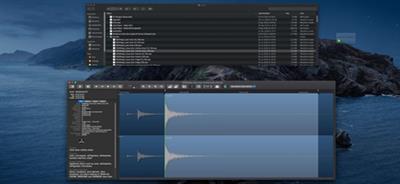
Play
Hit the space bar or double-click in the wave form to play. Or use auto-play to start playing the moment you select the file. Vari-speed is available too.[/c
Drag, Drop and Convert
In the Snapper wave form you can select a part of the sound file and:
drag it out, to create a new file.drag it to any DAW, sequencer or audio editorturn the selection into an mp3 file. (or m4a)split interleaved stereo files into separate .L and .R file sets or vise versaconvert to m4a and attach it to an email in one go.export to WAV (BWF, Broadcast Wave), mp3, or m4a (MPEG-4 audio).
Which formats can it handle?
All of them. Snapper opens over 50 sound file formats. That includes compressed files, split stereo, 192 kHz, 5.1 surround files, cds and videos containing audio. Snapper shows loops, markers, timestamps, regions, BWF annotations, even album covers. You name it, Snapper can handle it.
Finder
Snapper follows your file selection in the Finder. It shows a wave form as soon as you select an audio file.
Pro Tools, Nuendo, Logic, Cubase, Live.
You can drag (selections from) files directly to the cursor of your sequencer or audio editor.
Snapper loves SoundFX
Snapper now adds an informer that communicates all metadata within WAV files to MacOS Spotlight, so you can search and find Sound FX metadata in the Finder. This includes, BEXT, Copyright, creator, annotations, comments etc.
Universal Category System logo On top of that Snapper embeds the Universal Category System so you can look for synonyms and category explanations. Snapper displays the entire category and subcategory names, rather than their abbreviations.
Buy Premium From My Links To Get Resumable Support,Max Speed & Support Me



Help Us Grow – Share, Support
We need your support to keep providing high-quality content and services. Here’s how you can help:
- Share Our Website on Social Media! 📱
Spread the word by sharing our website on your social media profiles. The more people who know about us, the better we can serve you with even more premium content! - Get a Premium Filehost Account from Website! 🚀
Tired of slow download speeds and waiting times? Upgrade to a Premium Filehost Account for faster downloads and priority access. Your purchase helps us maintain the site and continue providing excellent service.
Thank you for your continued support! Together, we can grow and improve the site for everyone. 🌐
Related News
-
{related-news}
Comments (0)

Information
Users of Guests are not allowed to comment this publication.
Search
Updates
Partner
» TutBB
» Byte
» Crawli
» Warezomen
» Warez-DDL
» Raidrush
» KATZCD
» Free Ebooks Library
Your Link Here ?
(Pagerank 4 or above)
» Byte
» Crawli
» Warezomen
» Warez-DDL
» Raidrush
» KATZCD
» Free Ebooks Library
Your Link Here ?
(Pagerank 4 or above)