



Software / Converters →BitRecover Evernote Converter Wizard 4.0
Published by: Baturi on 19-04-2022, 00:24 |  0
0
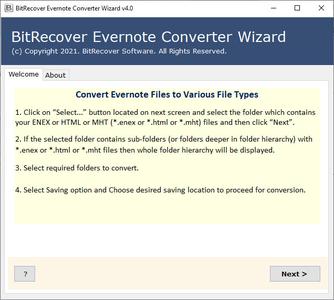
BitRecover Evernote Converter Wizard 4.0 | 44.3 Mb
Standalone utility to convert Evernote files to DOC, PDF, HTML, TXT, RTF, EML, MSG, PST, XPS, MHT, EMF, EPUB, OXPS, JPG, GIF, BMP, PNG, TIFF, DOC, DOCX, Extract Attachments.
Convert Evernote Notebook & Note files *.enex or *.html or *.mht
Convert multiple / single Evernote Exported Files at once to desired file format
Transfer Selective Evernote Notebook & Notes using selection Mode
Select File & Select Folder Mode to convert single / multiple Evernote files
Supports to convert Evernote Meeting Note, To-do, Weekly Planner, Project Plan
Evernote converter can be installed in multiple languages
Offers multiple file formats to store the converted Evernote data
Converts All EverNote Notes & Notebook with complete attachments & formatting
Ability to Create Single / Multiple PDF for every Note / Notebook
Operable on all Windows Operating System
Convert Evernote to Windows Live Mail, Windows Mail, etc.
Convert Evernote Notebook & Notes
Bitrecover Evernote Converter Wizard enables users to convert all exported Files from Evernote Note taking app to desired File Format. The ENEX converter software is capable to convert Evernote Notebook & Note Files (*.enex or *.html or *.mht ).
Convert all EverNote Data
The Evernote ENEX file converter software will convert all the data stored within Evernote Notebook (multiple Notes ) & Notes . It is capable to convert all types of Notes given by Evernote such as To Do, Meal Planner, Daily Reflection, Meeting Note, Project Plan, lecture Notes , Essay Outline , weekly Planner & much more.
Convert Bulk Evernote *.enex Files
Instead of selecting single message to export Evernote to JPG, HTML, DOC, etc. You can also choose bulk of Evernote files at once. Select the preferred folder(s) consisting of .enex, .html or .mht files to be converted to process bulk ENEX conversion.
Offers Dual Migration Modes
The Evernote Converter utility comes up with two options for data conversion of Evernote exported files to Adobe PDF, HTML, Word Doc/Docx, etc. file format. One can choose any of the desired option according to the need: Select Folders - it permits you to move multiple Evernote data files in desired format at once. Select Files - it allows you to migrate Evernote exported files into PDF, HTML, PNG, TIFF, etc. one by one.
System Requirements:
OS: Windows 11 & all below windows versions
Processor: Intel® Pentium 1 GHz processor(x86,x64) or equivalent
RAM: Minimum 512 MB is required
Home Page-
https://www.bitrecover.com/
https://hot4share.com/7n39h8juc6md/xu7f2.BitRecover.Evernote.Converter.Wizard.4.0.rar.html

https://rapidgator.net/file/afe8b75e06648885a283ee0ef6e7c1e5/xu7f2.BitRecover.Evernote.Converter.Wizard.4.0.rar.html

https://nitro.download/view/F57CF42ABBEFC2C/xu7f2.BitRecover.Evernote.Converter.Wizard.4.0.rar

https://uploadgig.com/file/download/821Ae521Ebd76bf2/xu7f2.BitRecover.Evernote.Converter.Wizard.4.0.rar
Help Us Grow – Share, Support
We need your support to keep providing high-quality content and services. Here’s how you can help:
- Share Our Website on Social Media! 📱
Spread the word by sharing our website on your social media profiles. The more people who know about us, the better we can serve you with even more premium content! - Get a Premium Filehost Account from Website! 🚀
Tired of slow download speeds and waiting times? Upgrade to a Premium Filehost Account for faster downloads and priority access. Your purchase helps us maintain the site and continue providing excellent service.
Thank you for your continued support! Together, we can grow and improve the site for everyone. 🌐
Related News
-
{related-news}
Comments (0)

Information
Users of Guests are not allowed to comment this publication.
Search
Updates
Partner
» TutBB
» Byte
» Crawli
» Warezomen
» Warez-DDL
» Raidrush
» KATZCD
» Free Ebooks Library
Your Link Here ?
(Pagerank 4 or above)
» Byte
» Crawli
» Warezomen
» Warez-DDL
» Raidrush
» KATZCD
» Free Ebooks Library
Your Link Here ?
(Pagerank 4 or above)