



Software →Memory Pictures 1.40 (x64)
Published by: Baturi on 10-09-2020, 21:04 |  0
0
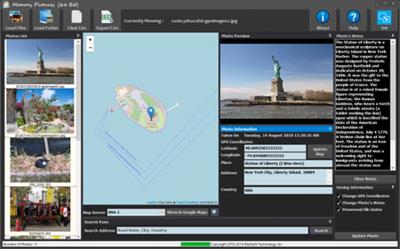
Memory Pictures 1.40 (x64) | 35.2 Mb
The core goal of Memory Pictures is to allow to keep your memories alive by assisting you in embedding the location and journal entries within the photo header. We all take photos with our digital cameras and smartphones and it certainly is a great way to look back at where we came from and where we have been to. However, a picture alone may not paint the whole story.
Utilising the already available resources built into the JPEG photos is the ability to store vast amount of information. Each time a digital camera takes a photo, all the settings such as shutter speeds, f-stops and so on are stored in the EXIF metadata stored in the photo. Smartphones as well some digital cameras comes with built-in GPS which will add the GPS coordinates of your location to each picture taken. Definitely a great thing to have. However, bad weather and a whole host of issues may render the GPS coordinates to be inaccurate. Also the GPS coordinates is of your position and not the position of your subject.
One of Memory Pictures goal is to allow you to accurately add or modify that GPS Coordinates with ease. This make use of the OpenStreet Maps to provide a visual map and the address query features. With this map support, it makes it easy to find the location and pin it to the photo or photos. Everything is done visually. Memory Pictures Creator will query OpenStreet Map database to get the Place, Address and Country which you can customize.
The EXIF's User Comment is also another useful component of the EXIF metadata but it is not really widely used but it can be very beneficial when used. Instead of developing a diary application or penning down your thoughts on a separate location, Memory Pictures now let you store them right inside your photos which you can view from any website or apps which supports it, including Memory Pictures.
Modern day Smartphones are widely used as digital cameras. One beautiful thing is that the Smartphones is that they come with GPS and does embed the location as to where the photo was taken into the photo so you can view back and know where those magnificent memories were captured in. It is great if the subject is right in front of you but at times we do take pictures from a distance but the phone only records the GPS of where you are standing at.
That's where Memory Pictures come in. It helps you :-
* Add/Modify GPS Coordinates embedded in the Photos
* Add/Modify Your Personal Notes or Stories, right into the Photos so you do not need to keep separate notes to the photos
Finding Your Photo Location is easy with Memory Pictures and you do not need to know the Latitude and Longitude of the place.
For Photos without any GPS coordinates inside it, like those taken from a Point-and-Shoot or DSLR camera, you can :-
a) Use the Search Feature by typing in the popular place name, address and/or country and it will pin the place for you. This is done by querying the massive regularly updated database from OpenStreet Map.
b) To fine-tune the location, just drag the Pin to the actual location and the GPS coordinates is automatically computed. Great for those photos which captures GPS Coordinates.
Operating Systems:
64 Bit Edition - Windows 10 (64 Bit), Windows 8 (64 Bit), Windows Server 2012 (64 Bit) and Windows Server 2016 (64 Bit)
Home Page -
https://www.batchimage.com/product/memory-pics-windows/Buy Premium From My Links To Get Resumable Support,Max Speed & Support Me



Help Us Grow – Share, Support
We need your support to keep providing high-quality content and services. Here’s how you can help:
- Share Our Website on Social Media! 📱
Spread the word by sharing our website on your social media profiles. The more people who know about us, the better we can serve you with even more premium content! - Get a Premium Filehost Account from Website! 🚀
Tired of slow download speeds and waiting times? Upgrade to a Premium Filehost Account for faster downloads and priority access. Your purchase helps us maintain the site and continue providing excellent service.
Thank you for your continued support! Together, we can grow and improve the site for everyone. 🌐
Related News
-
{related-news}
Comments (0)

Information
Users of Guests are not allowed to comment this publication.
Search
Updates
Partner
» TutBB
» Byte
» Crawli
» Warezomen
» Warez-DDL
» Raidrush
» KATZCD
» Free Ebooks Library
Your Link Here ?
(Pagerank 4 or above)
» Byte
» Crawli
» Warezomen
» Warez-DDL
» Raidrush
» KATZCD
» Free Ebooks Library
Your Link Here ?
(Pagerank 4 or above)