



E-Books →Advanced AutoCAD® 2022 Exercise Workbook For Windows®
Published by: book24h on 1-03-2023, 03:57 |  0
0
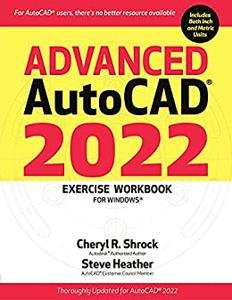
Free Download Advanced AutoCAD® 2022 Exercise Workbook: For Windows® by Cheryl R. Shrock, Steve Heather
English | September 10, 2021 | ISBN: 0831136677 | 448 pages | PDF | 28 Mb
Looking to take your AutoCAD skills to the next level, but don't know where to turn? Your search is over. AutoCAD® gurus Cheryl Shrock and Steve Heather have created the perfect learning system, packed with lessons, exercises, projects, and practical inside tips.
Refreshed and step-by-step exercises, frequently asked questions, and updated industry-specific projects highlight this edition covering the new AutoCAD 2022 software. This Exercise Workbook covers important AutoCAD commands and step-by-step procedures, including a thorough review of the latest features available (see the feature box, below), including Floating Drawing Tabs and Shared Views. All of this is reinforced by inch and metric exercises, designed to give you the practice needed to efficiently master key skills and complete more advanced projects. Plus, for the first time ever, an AutoCAD Quick Key Guide is included, providing a handy reminder for one-key shortcuts and multiple keyboard combinations.
Whether you are an instructor, a student of engineering, design, architecture, or computer graphics, or a hobbyist looking to hone your craft, you will find the Advanced AutoCAD Exercise Workbook an invaluable asset in your AutoCAD library.
New and/or Improved Features in AutoCAD 2022:Installer-The new Installer reduces the number of steps required for the initial install, improving performance.Floating Drawing Tabs-Drag a drawing file tab from the main application window to make it a separate drawing file window and have several drawings open at once. This is particularly useful if you have two or more monitors.Shared Views-Store your designs in the Cloud for other users to view, measure, and exchange feedback.Share Current Drawing-Share a link to your drawing file and others can view or edit that drawing in AutoCAD's online application.Trace-Turn this on so that collaborators can work together on drawing changes without altering the existing drawing.Redesigned Start Tab-Take advantage of easier access to recent work and saved drawing files from connected drives, as well as learning resources and announcements from Autodesk.

Please Help Me Click Connect Icon Below Here and Share News to Social Network | Thanks you !
Help Us Grow – Share, Support
We need your support to keep providing high-quality content and services. Here’s how you can help:
- Share Our Website on Social Media! 📱
Spread the word by sharing our website on your social media profiles. The more people who know about us, the better we can serve you with even more premium content! - Get a Premium Filehost Account from Website! 🚀
Tired of slow download speeds and waiting times? Upgrade to a Premium Filehost Account for faster downloads and priority access. Your purchase helps us maintain the site and continue providing excellent service.
Thank you for your continued support! Together, we can grow and improve the site for everyone. 🌐
Related News
-
{related-news}
Comments (0)

Information
Users of Guests are not allowed to comment this publication.
Search
Updates
Partner
» TutBB
» Byte
» Crawli
» Warezomen
» Warez-DDL
» Raidrush
» KATZCD
» Free Ebooks Library
Your Link Here ?
(Pagerank 4 or above)
» Byte
» Crawli
» Warezomen
» Warez-DDL
» Raidrush
» KATZCD
» Free Ebooks Library
Your Link Here ?
(Pagerank 4 or above)